


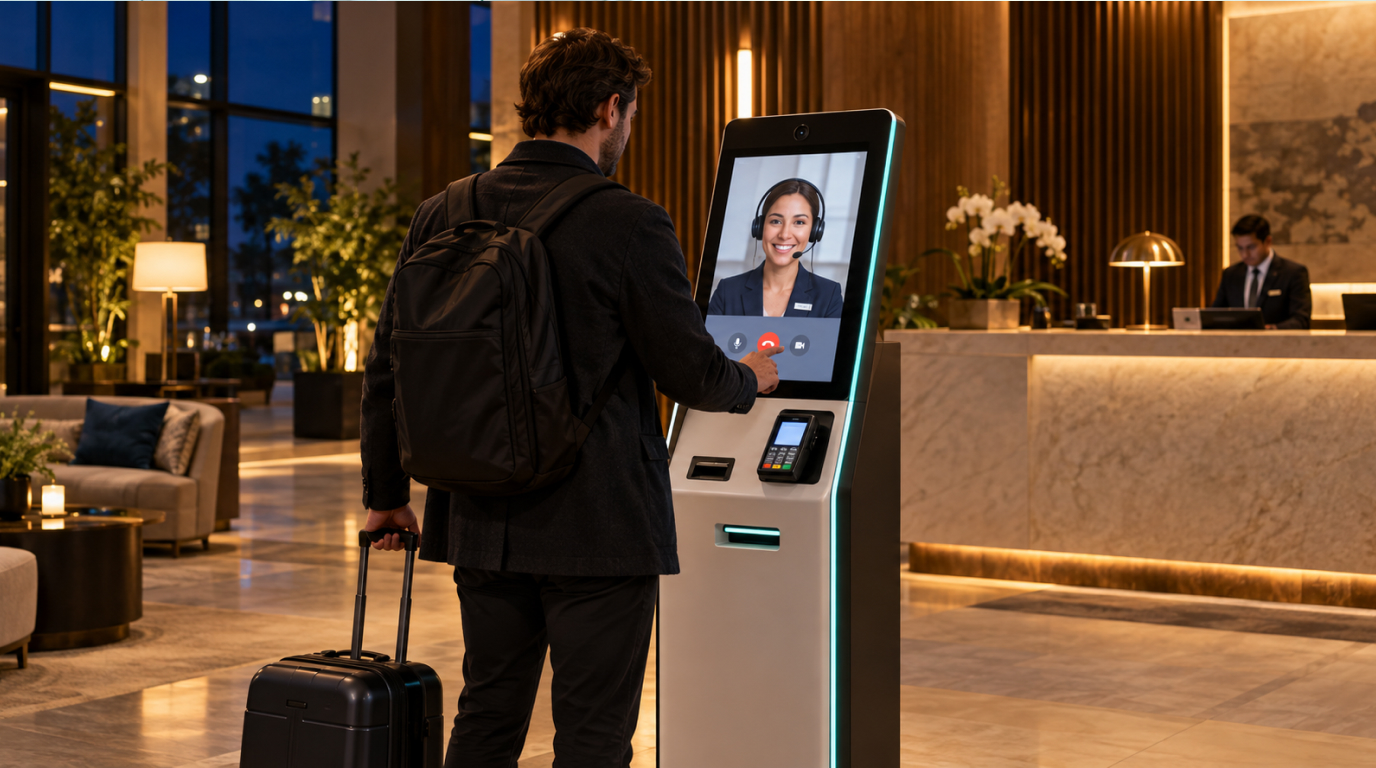
A guest arrives at 1:00 a.m. Their flight was delayed, their phone battery is low, and they want to get to their room. The front desk is quiet. What happens next?
A hotel kiosk can give that guest a way to begin check-in without waiting at the counter. But a successful late arrival depends on more than a touchscreen. The guest needs to get into the building, find their booking, complete the required steps, and receive working room access. If something goes wrong, they need someone who can help.
At Kiotel, the overnight shift is the starting point for working with hotels. We support late arrivals through hotel kiosks and live agents, and handle incoming calls during that shift. Our agents are trained specifically for each property. Kiotel supports more than 100 properties today.
This guide explains how to plan overnight front desk coverage around the guest at the kiosk and the caller trying to reach your hotel.
Start with overnight hotel kiosk coverage
Starting with the night shift gives your hotel a defined place to introduce Kiotel. Together, we review how guests arrive after hours, what calls come in, and which situations need someone on the property.
That starting scope should be clear to everyone: the hours covered, the check-in steps supported, how incoming calls are handled, and who can approve exceptions. Your team can then assess the overnight experience before considering broader coverage.
What is a hotel kiosk for after-hours check-in?
A hotel kiosk is a self-service station where guests can complete supported front desk tasks. For after-hours arrivals, the relevant tasks may include reservation lookup, registration, payment, and room access. The available steps depend on the kiosk software, the hotel's systems, and its operating rules.
The kiosk is the guest-facing part of the process. Behind it, the hotel still needs accurate reservation information, a room that is ready, and a clear path for handling exceptions.
If you're still comparing equipment and vendors, start with our self check-in hotel kiosk buyer's guide. Here, the focus is what happens when a guest arrives after the main desk coverage ends.
Map the arrival before choosing the workflow
Walk through your property as if you've never visited before. Start at the parking lot or entrance, not at the kiosk. Is the lobby open overnight? Can a guest see where to go? If the entrance is locked, how will someone without a room key reach the check-in station?
Write those answers into your arrival instructions. Send guests the location of the kiosk, any approved building-entry instructions, what they'll need to check in, and how to reach help. Keep the message short enough to read while standing outside with luggage.
Then map the check-in itself:
- Find the reservation. Establish how the guest identifies their booking and what happens if it doesn't appear.
- Complete required registration. Decide which identity and registration steps apply to your property and how exceptions reach an authorized person.
- Handle payment. Confirm how room charges, deposits, and prepaid bookings work with your supported payment setup.
- Provide room access. Test the entire path from room assignment to opening the door.
- Explain the next step. Give clear directions to the room and a way to get assistance after leaving the kiosk.
Test the connections that make check-in work
A polished demo can make the arrival look simple. Your test should use the systems and booking types your hotel actually relies on.
Reservation and room status
The property management system, often called the PMS, holds core reservation and room information. Confirm which information the kiosk can read or update, and when those updates happen. A booking appearing on a screen is only one part of the test. The process also needs to respect room readiness and prevent conflicting assignments.
Include a direct booking, a booking from an online travel agency, a prepaid stay, and an arrival that crosses midnight. Ask how the system treats an expected guest after the business date changes.
Payments and deposits
Test the payment cases your team sees at the desk. A prepaid room may still require a deposit under your hotel's policy. A declined card may need a different payment method or staff review. Guests should receive a clear explanation of what to do next.
Confirm who can approve an exception. A remote agent should follow the property's rules rather than make up a payment or refund decision during an overnight interaction.
Room keys and building access
Ask for a demonstration with your actual room-access setup. Where physical cards are supported, test card encoding, dispensing, and a failed key. If another access method is used, test its delivery and what happens when the guest cannot use it.
For Kiotel, compatibility with supported hotel systems is confirmed during the property review. Use the integrations page as a starting point for discussing your PMS, payment provider, and door locks.
Give guests a clear route to live help
Self-service works best when a guest knows how to stop and ask for help. A missing booking, a confusing charge, or an unusable key should lead to an understandable next step.
Decide who answers an overnight request and what they can resolve remotely. Then name an on-property contact for situations that require physical assistance. A video conversation can explain where a room is; it cannot repair a broken door lock.
Build a short exception checklist for the team:
- Reservation not found or guest details don't match.
- Payment cannot be completed.
- Assigned room isn't ready or the key doesn't work.
- Guest cannot comfortably use the kiosk and needs another check-in option.
- Kiosk, internet connection, or connected system is unavailable.
- A situation needs immediate on-property attention.
For each case, define the first response, the person responsible, and the fallback. Keep emergency procedures separate and clear.
Include incoming calls in overnight front desk coverage
A guest standing at the hotel kiosk is only one part of the night shift. Someone may call to ask about a room, explain a delayed arrival, or request help during their stay. Kiotel handles incoming calls during the covered overnight shift alongside kiosk guest support.
Plan the phone workflow with the same care as check-in. Review how calls reach the team, what agents need to know, and when a request should be escalated. Test a reservation inquiry and a call from an arriving guest so you can hear how your hotel is represented.
Why property-specific agent training matters
Kiotel's agents are trained specifically for the property they support. The goal is to give guests answers that match your hotel and to follow your operating procedures when a request needs attention.
During setup, review the information an agent needs for your night shift: arrival instructions, hotel policies, amenities, and escalation contacts. Decide who keeps that information current when something changes. A new parking arrangement or updated check-in policy should reach the people answering guests' questions.
Our guest services page explains how live support fits into hotel operations. For more on the remote front desk model, read our guide to virtual hotel receptionists.
Make the kiosk easy to find and use
Place the station where arriving guests can spot it without searching the lobby. Check lighting, screen glare, room for luggage, and whether guests with different mobility or communication needs can use the setup. Provide an assisted alternative when they cannot.
Read the screen instructions aloud during testing. Replace vague error messages with a useful action. “Please contact the front desk” isn't enough if the guest is standing at an empty desk and doesn't know how to reach anyone.
Also consider privacy at the station. Position it thoughtfully, limit what others can see during an interaction, and confirm that a completed or abandoned session clears the previous guest's information.
Test the overnight shift before launch
Before the first covered overnight shift, test the arrival and phone workflows while your team is available to observe and help. Record where guests hesitate, which bookings require assistance, and whether kiosk requests and incoming calls reach the right person.
Track completed check-ins, incoming calls handled, requests for help, time to resolve exceptions, and on-property interventions. Look at the unsuccessful arrivals as closely as the successful ones. If guests keep getting stuck at the same step, fix that step before extending the rollout.
Compare the workload with your previous process. Time saved at the counter only helps if it doesn't reappear as extra reconciliation or overnight callbacks. Use what you learn to adjust arrival messages, staff instructions, and system configuration.
How Kiotel supports your overnight front desk
Kiotel combines self-service hotel check-in kiosks with live virtual front desk support and property-specific workflows. Supported capabilities and escalation paths are configured around the hotel's systems and operating requirements.
Kiotel supports more than 100 properties today. We start customer engagements with overnight coverage, including incoming calls during that shift, with agents trained specifically for each property. Bring your actual overnight scenarios to the property review so we can walk through how support would work for your hotel.
Frequently asked questions
Can we start with Kiotel just for the overnight shift?
Yes. Overnight coverage is Kiotel's starting point with customers. The setup covers the agreed night shift, including supported hotel kiosk workflows, live guest assistance, and incoming calls.
Does Kiotel answer incoming hotel calls during the night shift?
Yes. Kiotel handles incoming calls during the covered shift, alongside guest support through the hotel kiosk. Call handling and escalation procedures are agreed for your property.
Are Kiotel agents trained for our hotel?
Yes. Kiotel agents are trained specifically for the property they support, so guest assistance follows that hotel's information and operating procedures.
Can guests check in at a hotel kiosk after midnight?
They can where the hotel has configured and tested that workflow. The hotel needs to account for lobby access, reservation status after the business date changes, payment requirements, available rooms, and guest support.
Does a hotel kiosk replace overnight staff?
A kiosk can handle supported routine tasks, but the hotel still needs a coverage plan. Decide which requests can be handled remotely and who responds when a situation requires someone on the property.
What happens if a guest cannot finish self-service check-in?
The guest should have an obvious way to reach assistance. Define that handoff before launch, including an alternative check-in process if the kiosk or a connected system is unavailable.
Can every hotel kiosk issue room keys?
No. Room-access capabilities depend on the hardware, software, and supported lock integration. Confirm compatibility and test a working key or access credential at your own property.
Plan your next late arrival
Choose one ordinary overnight booking and walk it from the entrance to the room. Then repeat the test with a missing reservation or failed payment. Those two journeys will tell you more about readiness than a feature list alone.
Book a Kiotel demo to walk through overnight hotel kiosk coverage, incoming calls, and agent training for your property.